
Share a folder
Foldocs needs only a link to the folder. The folder is public, as the site is.
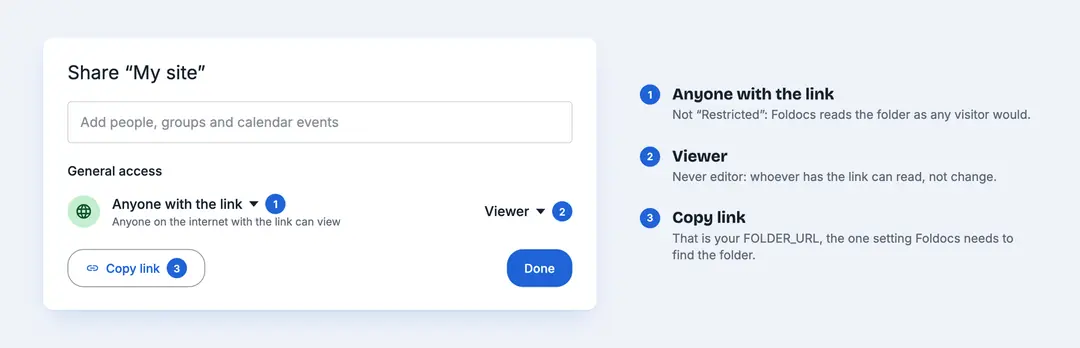
In Google Drive
- Make a folder for your site, say
My site. - Right-click it, choose Share, and under General access pick Anyone with the link, as Viewer.
- Copy the link. Foldocs uses it to find the folder.
- Create a free Google API key for the Drive API (the README has the three commands). The key identifies Foldocs to Google; it gives no access to anything.
Google Docs and Word files both work; a Word file stays a Word file, or Drive converts it on upload.
In Nextcloud
Create a read-only share link for the folder, with a password if you want one, and give Foldocs the link. No account or key is needed. Pages are Word files (.docx), so set Collabora or OnlyOffice to save in that format. A share has no file descriptions, so photos have no captions.
What public means
Everything in the folder is published. That is the one rule to remember.
| Do | Don't |
|---|---|
| Keep drafts in another folder until they're ready | Park a draft in the site's folder |
| Empty the trash of anything that never belonged | Trust the trash to hide things |
| Share the folder as Viewer | Give the link edit rights |
A folder shared by link isn't listed anywhere: search engines don't index it, and its address can't be guessed. The site doesn't link back to it unless its theme does, as this one does. Image addresses don't contain file IDs.
Check it
Open the link in a private window: what you see there is what Foldocs sees. If you unshare the folder, the site stays as it was until you share it again; Foldocs doesn't empty a site because it can't read the folder.