
Start here
This site is a folder. Here is how it fits together.
Everything you read on foldocs.com is a file in one public Google Drive folder. Foldocs checks that folder every minute, and when something changed, it makes the pages again. There is no database behind it, no admin panel, and no one logging in.
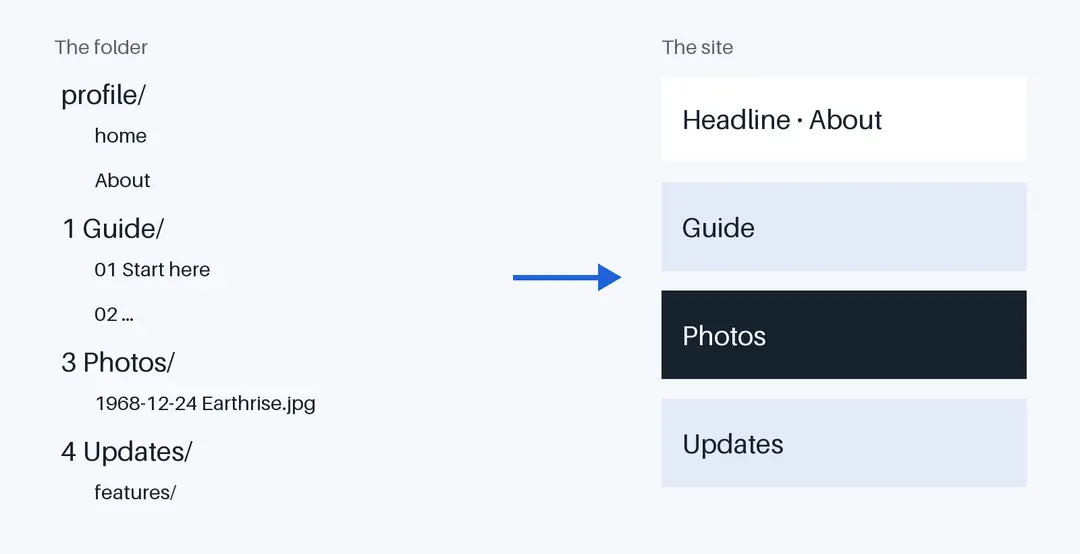
This Guide is the folder 1 Guide. Its documents are numbered (01 Start here, 02 Share a folder and so on), so it keeps that order and shows the numbers instead of dates. Every page links to its own document: try See this in Google Drive, next to the title.
The Guide, page by page
- Share a folder: the only setup there is
- Folders become sections: the structure of the site
- Documents become pages: everything a page can hold
- Photos and images: sized for every screen
- The profile folder: the home page, About, CV and Contact
- Dates and order: what comes first
- From folder to site: what happens behind the scenes
- Make it yours: your colours, your fonts, your corners
- Themes: a whole new look, a logo, other languages
- Search, feeds and the rest: what every site gets
- What public means: the one rule to remember
Five minutes to your own
Make a folder, share it with a link, put a document called home in a folder called profile, and a document in a second folder. That is a website. Get started has the rest.